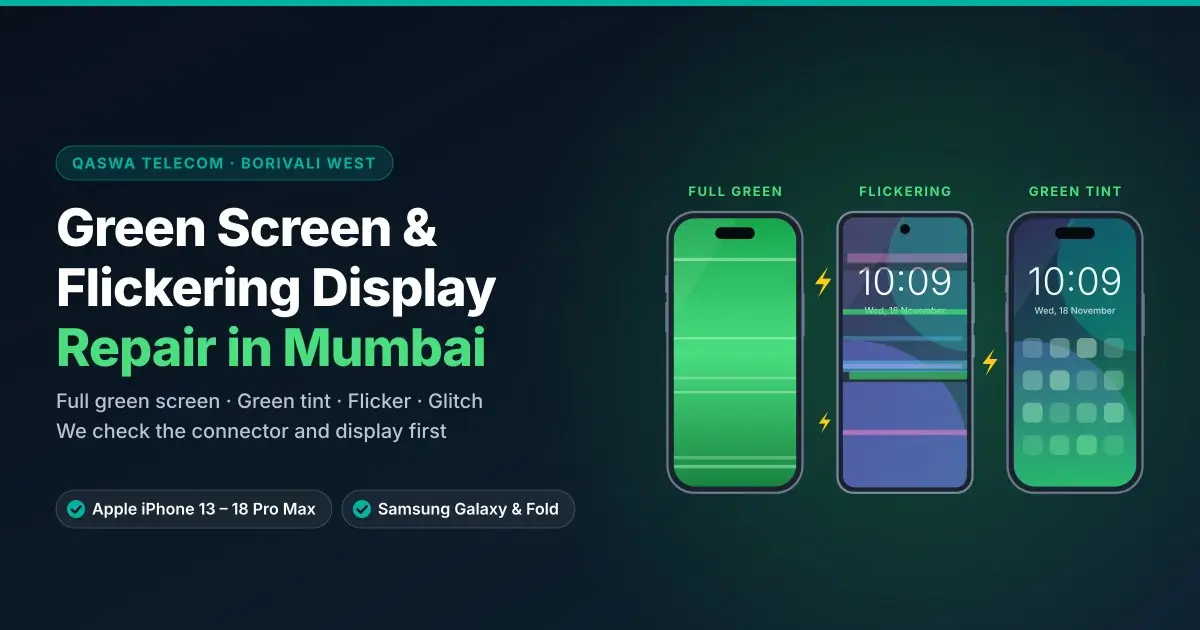
Has your phone screen suddenly turned green, started flickering, or does the picture glitch and shake? This is one of the most common display problems on OLED and AMOLED phones like Apple iPhone, Samsung Galaxy, Google Pixel and OnePlus. At QASWA TELECOM, Borivali West, we find the real cause first, so you only pay for the repair you actually need.
What Does a Green Display Problem Look Like?
- The whole screen turns green, or only one part of it
- A green tint appears for a few seconds after unlocking or at low brightness
- The screen flickers or blinks, especially when brightness is low
- The picture glitches, shakes or shows coloured noise
- The screen goes black but the phone still rings and vibrates
- The green area or flicker slowly gets worse day by day
Why Does a Phone Screen Turn Green?
- Drop or impact: the display panel can break inside even when the glass looks fine
- Pressure: sitting with the phone in a back pocket or a tight bag can damage the panel
- Water or moisture entering the phone and reaching the display
- Loose or damaged display connector inside the phone
- A low-quality screen fitted in an earlier repair
- Age and heat: OLED panels can develop faults over time
- Software: rarely, a tint appears after an update and goes away with the next update
Quick Checks You Can Do First
- Restart the phone. If the green screen comes back, the problem is not a small software glitch.
- Update the software to the latest version.
- Take a screenshot and look at it on another phone. If the screenshot looks normal, the fault is in the display hardware, not the software.
- Change the brightness and see if the flicker changes. Flicker only at low brightness is common with a damaged OLED panel.
If the green screen or flicker is still there after these checks, the display needs a proper check in the shop.
How We Diagnose and Repair It
- Display test: we check the colours, brightness, touch and the exact area of the green or flicker
- Connector check: we open the phone and check the display connector. If it is only loose or dirty, fixing it can solve the problem without a new screen
- Panel check: if the display panel itself is damaged inside, we explain this and give you the price before starting
- Screen replacement: when the panel is damaged, the screen is replaced
- Final test: touch, brightness, colours, Face ID or fingerprint, front camera and sensors are checked before you take the phone home
Seeing a thin green or pink line instead of a full green screen? See green and pink line on display. Black spots or a broken display? See damaged screen replacement.
Phones We Repair for Green Screen and Flicker
Apple iPhone 13 to iPhone 18 Pro Max
- iPhone 18 series: iPhone 18 Pro Max, iPhone 18 Pro
- Apple iPhone Duo: iPhone Duo
- iPhone 17 series: iPhone 17 Pro Max, iPhone 17 Pro, iPhone 17, iPhone Air
- iPhone 16 series: iPhone 16 Pro Max, iPhone 16 Pro, iPhone 16 Plus, iPhone 16, iPhone 16e
- iPhone 15 series: iPhone 15 Pro Max, iPhone 15 Pro, iPhone 15 Plus, iPhone 15
- iPhone 14 series: iPhone 14 Pro Max, iPhone 14 Pro, iPhone 14 Plus, iPhone 14
- iPhone 13 series: iPhone 13 Pro Max, iPhone 13 Pro, iPhone 13, iPhone 13 mini
Samsung Galaxy S Series
Green screen and flicker are very common on Samsung AMOLED displays. We repair the Galaxy S26 Ultra, Galaxy S25 Ultra, Galaxy S24 Ultra, Galaxy S23 Ultra, Galaxy S22 Ultra and all other Samsung Galaxy models.
Samsung Galaxy Z Fold and Z Flip
On foldables, a green or flickering screen can come from the display panel, or from the middle flex cable when the problem changes while folding. We check both on the Z Fold 8 Ultra, Z Fold 7, Z Fold 6, Z Flip 7, Z Flip 6 and other Fold and Flip models. If the screen goes green only while folding, see foldable flex cable and hinge repair.
Google Pixel, OnePlus, Vivo, Oppo and More
We also repair green screen and flicker on Google Pixel, OnePlus, Vivo, iQOO, Oppo, Xiaomi and other smartphones, plus iPad and Apple Watch. See all brands we repair.
Do Not Ignore a Green Screen
A green screen or flicker usually gets worse with time. One day the screen can go fully black, and then it becomes hard to take a backup of your photos and data. Until you visit us:
- Back up your phone while the screen still works
- Keep the phone away from water and heat
- Do not press on the screen or keep it in a back pocket
- Avoid cheap screen replacements: a poor-quality screen can flicker again
Warranty
New display replacement comes with a 3-month warranty. New drops, physical damage and water damage after the repair are not covered.
Frequently Asked Questions
Why did my phone screen suddenly turn green?
Most often the OLED or AMOLED display panel is damaged inside, after a drop, pressure or water. Sometimes the display connector is loose. Rarely, it is a software issue that a restart or update fixes.
Can a green screen be fixed without replacing the screen?
Sometimes. If the cause is a loose or dirty connector, fixing it can solve the problem. If the display panel is damaged, screen replacement is the only real fix. We check first and tell you before starting.
Why does my screen flicker only at low brightness?
Flicker at low brightness is a common sign of a damaged OLED panel. If it continues after a restart and update, the display needs to be checked.
Will I lose my data?
Screen repair does not normally erase data, but we always recommend a backup, especially because a green screen can get worse.
Visit QASWA TELECOM
Shop No-8, 1st Floor, Thakkar Shopping Centre, S.V. Road, Borivali West, Mumbai 400092. Open every day, 11:00 AM to 9:00 PM. Easy to reach from Kandivali, Dahisar, Malad and Mira Road. Send your phone model and a photo or video of the green screen on WhatsApp +91 93243 16048 or contact us.